General
Facebook Link Download Guide – Tips, Tools, and Techniques to save FB link videos 2026

Ever stumbled upon a perfect Facebook video, a hilarious clip, a crucial tutorial, or a precious memory, only to watch it disappear into the endless scroll, wishing you could save it for later? You’re not alone. With over 2.45 billion active users, Facebook is a vast repository of video content that shapes our entertainment and information diets. Yet, the platform itself doesn’t offer a built-in “download for offline viewing” button for most public content. This guide for 2026 is your complete roadmap to mastering the facebook link download, ensuring you never lose access to valuable content again. We’ll walk you through the safest, most efficient, and highest-quality methods to save videos directly to your devices, discuss the crucial legal landscape, and help you choose the perfect tool for your needs.
Understanding Your Facebook Link Download Options
Before you paste your first link, it’s essential to understand the ecosystem of download tools. Choosing the right method can mean the difference between a quick, high-quality save and a frustrating, potentially risky experience with malware or broken files. The tools available generally fall into four main categories, each with its own strengths and ideal use cases, from casual one-off downloads to professional, high-volume needs.
The landscape has evolved significantly, with developers constantly updating their services to bypass Facebook’s changes and support new features like Reels and high-resolution streams. Understanding these categories empowers you to make an informed decision that aligns with your technical comfort, device, and how often you plan to download videos.
Online Downloaders: The Quick and Easy Solution
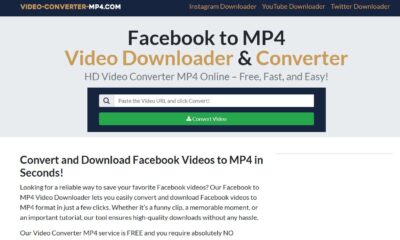
Online video downloaders are web-based services that require no software installation. You simply navigate to the website (like video-converter-mp4.com, SnapSave, or Toolzu), paste the copied Facebook video URL into a search box, and hit download. The tool fetches the video and provides you with a direct download link, often in multiple quality options. Their greatest advantage is universal accessibility; they work on any device with a web browser, including Windows, Mac, Android, and iOS.
These services are perfect for occasional downloads. They are generally free, though some may be supported by ads. However, it’s vital to use reputable sites. A good service like video-converter-mp4.com, which has been consistently updated since at least 2021, will clearly state it doesn’t host videos but merely acts as a bridge to Facebook’s servers, ensuring a degree of safety and anonymity. For iPhone users, accessing these sites through a file management app like Documents by Readdle is often the most straightforward workaround to save videos directly to the camera roll.
Dedicated Software and Browser Extensions
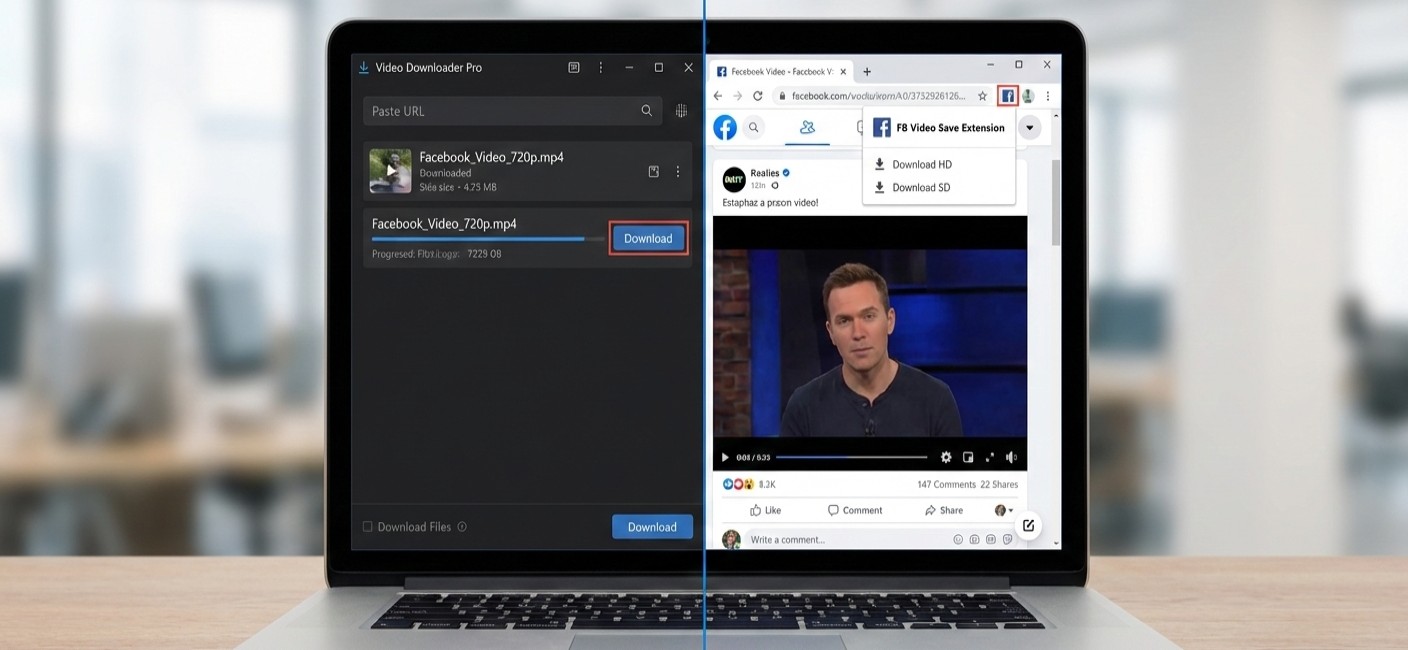
For users who frequently download videos or need advanced features, dedicated desktop software is the powerhouse option. Programs like By Click Downloader, Allavsoft, and CleverGet offer robust functionality that goes beyond simple downloads. These tools often support batch downloading (grabbing multiple videos at once), schedule downloads, convert videos to various formats, and even extract audio as MP3 files. They typically offer higher stability and faster speeds by leveraging your computer’s hardware.
Similarly, browser extensions (like the Video Downloader PLUS for Chrome) add a convenient download button directly to your Facebook interface. Once installed, you can download videos with a single click without leaving the page. These are incredibly convenient but are usually limited to the browser and device on which they’re installed. When choosing software, consider your needs. A professional tool like CleverGet, capable of lossless 8K video downloads, comes with a higher price tag, while simpler, effective options like By Click Downloader offer robust free versions.
Facebook Link Download Guide
Step-by-Step Guide to Downloading from Any Device
The core principle of a facebook link download is universal: copy the video’s unique URL and provide it to a download tool. However, the steps can vary slightly depending on whether you’re on a computer, an Android phone, or an iPhone. This section provides clear, device-specific instructions to ensure success every time, incorporating the latest methods valid for 2026.
On Desktop Computers (Windows & Mac)
The desktop environment offers the widest array of tool choices. The process is generally straightforward:
Locate and Copy the Video Link: On Facebook, find the video you want to save. Click the three dots (
...) in the top right corner of the post and select “Copy link“. Alternatively, you can copy the URL directly from your browser’s address bar while the video is open.Choose and Use Your Tool:
For Online Downloaders: Open a new tab, go to your chosen downloader website, paste the link into the input field, and press “Download” or “Go”.
For Browser Extensions: If you have an extension installed, a download icon or button will often appear near the video itself. A single click will start the process.
For Desktop Software: Open your downloader program, paste the copied link into its designated area, select your preferred quality and format, and initiate the download.
Select Quality and Save: The tool will process the link and present available download options (e.g., SD, HD, 4K). Choose your preference, and the video file (usually in .MP4 format) will be saved to your computer’s default “Downloads” folder.
On Mobile Devices (Android & iOS)
Downloading on mobile requires navigating platform-specific restrictions, especially on iOS.
For Android Users: You have several flexible options. You can use your mobile browser to visit online downloader sites just like on a desktop. Alternatively, you can install dedicated apps from the Google Play Store, such as “Video Downloader for Facebook”. These apps often feature a built-in browser where you log into Facebook, find your video, and tap a download button. Be mindful of user reviews; some apps have been criticized for excessive ads in 2025.
For iPhone/iPad Users: Apple’s restrictions make direct downloading trickier. The most reliable method involves using a file manager app with browser capabilities, such as Documents by Readdle.
Copy the Facebook video link from the official Facebook app or Safari.
Open the Documents app, use its browser to navigate to a trusted online downloader site (like SnapSave.app).
Paste the link, download the video, and it will be saved within the Documents app’s storage.
From there, you can usually export the video to your iPhone’s Photos library.
A visual walkthrough can help clarify the mobile download process, especially for iOS users.
Legal, Ethical, and Safety Considerations
Downloading videos from the internet isn’t a digital free-for-all. Respecting intellectual property and protecting your device are paramount. Before you download, you must consider the legal and ethical implications, as well as the security risks associated with third-party tools.
Copyright and Fair Use
It is technically legal to download publicly available content for personal, offline viewing. This falls under the concept of “time-shifting,” similar to recording a TV show. However, the moment you repurpose, redistribute, or use the downloaded content for commercial gain, you likely violate copyright law and Facebook’s Terms of Service. The content creator retains all rights. If you plan to use a clip (even with credit) in your own project, it’s best to seek explicit permission from the creator. As noted by many tools, downloaded content is not yours to republish freely.
Choosing Safe and Trustworthy Tools
The internet is filled with downloader sites and apps of varying repute. To avoid malware, data theft, or intrusive ads, follow these safety guidelines:
Stick to Reputable Services: Opt for well-known tools with long histories and positive reviews, such as those listed in authoritative software comparisons. Look for services that explicitly state they do not store your downloaded videos or track your download history.
Beware of “Too Good to Be True” Offers: Avoid sites that demand you download an .exe file to “unlock” the video or ask for your Facebook login credentials on a non-Facebook page.
Read Recent User Reviews: Especially for mobile apps, check recent reviews (from 2025/2026) to see current user experiences regarding functionality and ad frequency.
Use Your Antivirus Software: Ensure real-time protection is active, especially when trying new desktop software.
Comparison of Top Facebook Downloader Tools in 2026
With so many options, choosing can be overwhelming. This comparison table breaks down some of the top-rated tools based on their platform, key features, and cost, helping you match a tool to your specific needs.
| Tool Name | Best For | Platform | Key Features | Cost |
|---|---|---|---|---|
| FDown.net | Quick, web-based downloads up to 4K | Web, Chrome Extension | Constant updates, no registration, video-to-MP3 conversion | Free |
| By Click Downloader | HD/4K & private video downloads | Windows, Browser Extensions | One-click download from browser, batch downloads, subtitle support | Free / $19.99 Premium |
| video-converter-mp4.com | High-quality (4K) downloads with ease | Web (All devices) | Emphasis on 4K/2K quality, simple interface, works on iOS via Documents app | Free (ad-supported) |
| CleverGet | Professional, lossless 8K video downloads | Windows, Mac | Batch processing, in-built browser, ad removal, 8K/320kbps audio | From $139.95/year |
| Video Downloader for Facebook (App) | Android mobile convenience | Android | Built-in browser, download via link without login | Free (ad-supported) |
Evaluating Your Needs for the Right Tool
Your ideal tool depends on your primary use case. For the casual user who wants to save a funny clip once a month, a free online downloader like FDown.net or Publer’s tool is perfectly adequate. For the content enthusiast or researcher who archives many videos, a desktop software with batch download capabilities like Allavsoft or Leawo Video Downloader saves immense time.
If video quality is non-negotiable, seek out tools that specialize in 4K or even 8K downloads, like SnapSave or CleverGet. For mobile-first users, finding a well-reviewed app with a tolerable ad experience is key, or mastering the iOS workaround with the Documents app is essential. Always balance features with ease of use; the most powerful software is useless if you find its interface confusing.
Advanced Techniques and Troubleshooting
Even with the right tool, you might encounter hurdles. Here’s how to solve common problems:
“Video Not Found” or “Link Not Detected” Error: This is the most common issue. First, ensure the video is public. You cannot download videos from private accounts or groups where you lack viewing permissions. Try copying the link again directly from the browser address bar. The issue may also be on the downloader’s end; Facebook frequently changes its architecture, so using a service known for regular updates is crucial.
Downloaded Video Has No Sound: This often happens with videos containing copyrighted music. Some downloaders, like FDown.net, offer a specific “Video with No Audio” download option to circumvent this block.
Download is Slow or Fails: This can be due to your internet connection, the video’s length, or server load on the free downloader site. For long videos, desktop software with breakpoint resume functionality (like Allavsoft) is invaluable, as it allows you to pause and resume downloads.
Want to Convert or Edit the Video After Downloading? Downloading is often just the first step. You might want to convert the file to a different format, trim it, or merge clips. This is where a comprehensive tool like our Video Converter MP4 platform shines, allowing you to seamlessly move from download to editing and conversion in one workflow.
For those who need more than just a download, who want to convert, edit, and perfect their video content. exploring a dedicated video conversion suite is the logical next step. While simple downloaders fetch the file, a professional converter gives you complete control over the final product.
Featured Brand: Video Converter MP4
When your project requires more than just saving a file, when you need to convert, compress, or edit your downloaded Facebook videos, a specialized tool becomes essential. Online downloaders are great for grabbing content, but they often lack the post-processing power needed for content creation, professional presentations, or archiving.
This is where a dedicated platform like Video Converter MP4 adds tremendous value. It is designed as the next step in your workflow, transforming your downloaded videos into precisely the assets you need.
Universal Format Conversion: Easily convert your downloaded .MP4 files to AVI, MOV, MKV, WMV, or extract audio to MP3, AAC, and more for compatibility with any device or software.
Advanced Editing Toolkit: Go beyond downloading. Trim unwanted sections, merge multiple clips into one, add subtitles, or adjust resolution and bitrate to optimize file size without sacrificing quality.
Batch Processing Power: Save hours by converting or editing entire folders of downloaded videos simultaneously, a must-have for professionals and serious hobbyists.
High-Quality Engine: Ensure your conversions are lossless or near-lossless, preserving the clarity and detail of the original Facebook link download, even in 4K.
Think of it this way: a Facebook video downloader is your library card, allowing you to borrow the book. A video converter like ours is your personal editing studio, allowing you to translate, annotate, and rebind that book to suit your exact purpose. For a seamless journey from finding a video to making it truly yours, explore the tools available at Video Converter MP4.
Mastering the facebook link download in 2026 is about combining the right tool with responsible practices. Whether you choose a quick online service, a powerful desktop suite, or a mobile app workaround, you now have the knowledge to save the videos that matter to you. Remember to always respect creators’ copyrights, prioritize your digital safety by choosing reputable tools, and consider advanced conversion solutions when your projects demand more. Ready to take full control of your video content?
Visit Video Converter MP4 today to discover professional-grade tools that go beyond simple downloading.






Facebook Story Video Download – Professional Insights and Best Practices 2026
Ever seen a Facebook Story you wanted to save before it disappeared after 24 hours? You are not alone. With...

The Only Facebook Video Downloader You Need to Know in 2026
Are you looking for a reliable way to save Facebook videos for offline viewing, content reuse, or archiving, without compromising...

How to Download Instagram Videos by Link
Have you ever found an Instagram video you wanted to save instantly, without installing apps or risking your privacy? In...

Video DL Online Guide, Smart Techniques and Safe Downloads 2026
Have you ever wanted to save a Facebook video instantly, without installing risky software or losing quality?In 2026, video consumption...


HD Video Download HD – Complete Guide to High-Quality Video Downloads 2026
Are you frustrated with low-quality video downloads that look pixelated and blurry on your screen? In 2026, streaming has become...


Download Story Insta – Smart Tips and Safe Techniques to get Insta videos in 2026
Have you ever watched an Instagram story and wished you could save it before it disappears forever?Instagram stories remain one...


Facebook MP4 Downloader Online Guide, Creative Tips and Techniques 2026
Are you looking for a fast, safe, and reliable way to save Facebook videos in MP4 format without installing software?In...


A Guide to Using a Futures Contract Calculator to Unlock Profit Potential
As a trader, have you ever found yourself unsure about the potential profit or loss of a futures trading contract?...


A Timeless Way to Display Custom Funded Certificate Plaque
You worked hard to earn that certificate. Whether it represents funding approval, a financial milestone, a business achievement, or a...


Leveraging YouTube as a Game-Changer for Film Production Promotion
Filmmakers have a powerful ally in their quest to promote their productions: YouTube. As one of the largest video-sharing platforms...

 General2 years ago
Step-by-Step Guide: How to download Facebook Videos as MP4
- General8 months ago
Master Facebook Video Download by Link: Essential Guide 2026
- Web Resource3 years ago
Enhancing Your Video Web Content for Online Audiences
- General9 months ago
9 Best Facebook Video Downloader App Choices for 2026
- General9 months ago
7 Essential Free Online FB Video Downloader Tools for 2026
- Web Resource7 months ago
Facebook Story Video Download – Professional Insights and Best Practices 2026
- General5 months ago
Top 5 Ways to Download Instagram Videos Without an App in 2026
- Web Resource9 months ago
Video DL Online Guide, Smart Techniques and Safe Downloads 2026