General
Step-by-Step Guide: How to download Facebook Videos as MP4

We’ve all been there—you come across a hilarious, inspiring, or useful video on Facebook, and you want to save it to your device. Maybe it’s a cooking tutorial, a motivational clip, or a cute animal video you want to watch offline. Unfortunately, Facebook doesn’t make it easy to download videos directly. But don’t worry! In this guide, I’ll walk you through the process of converting Facebook videos to MP4 format in a way that’s easy to follow, whether you’re on a computer or a phone.
Step 1: Find the Video You Want to Save
First things first, open Facebook and locate the video you’d like to download. It could be in your feed, on a friend’s profile, or in a group. Make sure the video is public or shared with you—private videos can’t be downloaded unless you have the owner’s permission.
Step 2: Copy the Video Link
Once you’ve found the video, you’ll need to grab its link. Here’s how:
- On a Computer:
- Click on the video to open it in a larger view.
- Look at the address bar of your browser—this is the video’s URL.
- Highlight the URL, right-click, and select “Copy.”
- On a Phone:
- Tap the three dots (•••) in the top-right corner of the video post.
- From the menu, choose “Copy Link” or “Copy URL.”
Step 3: Use an Online Video Downloader
Now that you have the video link, it’s time to use an online tool to convert it to MP4. There are plenty of free websites that can do this for you. Some reliable options include:
- imediaconverter.com
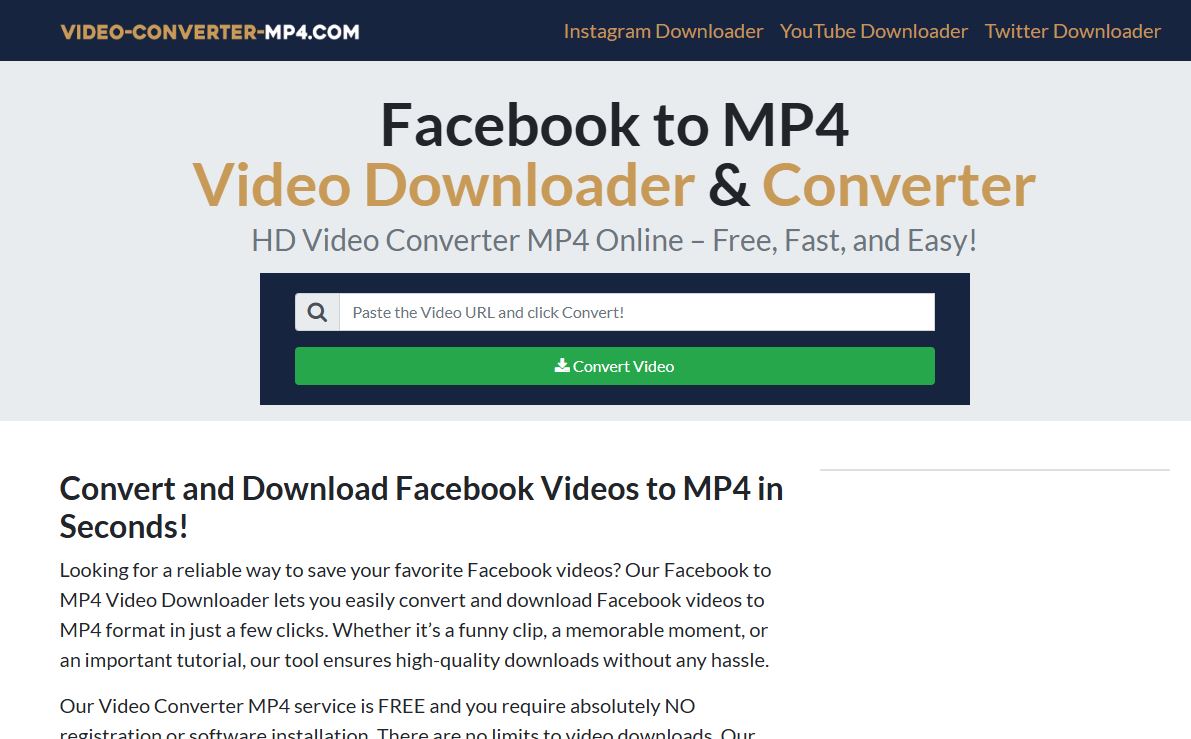
- Video-Converter-MP4.com
- Getfvid.com
- OnlineVideoConverter.com
Here’s how to use one of these tools:
- Open a new tab in your browser and go to the website of your choice.
- Paste the Facebook video URL into the input box on the site.
- Click the “Download” or “Convert” button.
Step 4: Select MP4 Format and Quality
After the website processes the link, it will show you a list of download options. Look for the MP4 format and choose the quality you prefer (e.g., 360p, 720p, or 1080p). Higher quality means a larger file size, so pick what works best for your needs.
Step 5: Download the Video
Once you’ve selected the format and quality, click the “Download” button. The video will start downloading to your device. Depending on your browser settings, you may need to choose a folder to save the file. After a few moments, you’ll have the MP4 file ready to go!
Alternative Method: Use a Mobile App
If you’re on your phone and prefer not to use a website, there are apps that can help you download Facebook videos directly. Here’s how:
- Download an App:
- For Android: Try “Video Downloader for Facebook.”
- For iOS: Check out “My Media” or a similar app.
- Copy the Video Link:
- Follow the same steps as above to copy the video URL.
- Paste the Link in the App:
- Open the app, paste the link, and follow the instructions to download the video in MP4 format.
Step 6: Check Your Download
Once the download is complete, locate the file on your device. You can usually find it in your “Downloads” folder or the folder you selected. Play the video using your favorite media player (like VLC, Windows Media Player, or QuickTime) to make sure it works perfectly.
A Few Things to Keep in Mind
- Respect Privacy and Copyright: Only download videos that you have permission to save. Avoid using this method for private or copyrighted content unless you have explicit approval.
- Use Trusted Tools: Stick to well-known websites and apps to avoid malware or low-quality downloads.
- Internet Connection: A stable internet connection will make the process faster and smoother.
And that’s it! With these simple steps, you can easily convert and download Facebook videos to MP4 format. Whether you’re saving a video for offline viewing, sharing with friends, or keeping it for future reference, this guide has you covered. Now go ahead and save those videos—you’ll never miss out on great content again!






Facebook Story Video Download – Professional Insights and Best Practices 2026
Ever seen a Facebook Story you wanted to save before it disappeared after 24 hours? You are not alone. With...

The Only Facebook Video Downloader You Need to Know in 2026
Are you looking for a reliable way to save Facebook videos for offline viewing, content reuse, or archiving, without compromising...

How to Download Instagram Videos by Link
Have you ever found an Instagram video you wanted to save instantly, without installing apps or risking your privacy? In...

Video DL Online Guide, Smart Techniques and Safe Downloads 2026
Have you ever wanted to save a Facebook video instantly, without installing risky software or losing quality?In 2026, video consumption...


HD Video Download HD – Complete Guide to High-Quality Video Downloads 2026
Are you frustrated with low-quality video downloads that look pixelated and blurry on your screen? In 2026, streaming has become...

Download Story Insta – Smart Tips and Safe Techniques to get Insta videos in 2026
Have you ever watched an Instagram story and wished you could save it before it disappears forever?Instagram stories remain one...


Facebook MP4 Downloader Online Guide, Creative Tips and Techniques 2026
Are you looking for a fast, safe, and reliable way to save Facebook videos in MP4 format without installing software?In...


A Guide to Using a Futures Contract Calculator to Unlock Profit Potential
As a trader, have you ever found yourself unsure about the potential profit or loss of a futures trading contract?...


A Timeless Way to Display Custom Funded Certificate Plaque
You worked hard to earn that certificate. Whether it represents funding approval, a financial milestone, a business achievement, or a...


Leveraging YouTube as a Game-Changer for Film Production Promotion
Filmmakers have a powerful ally in their quest to promote their productions: YouTube. As one of the largest video-sharing platforms...

 General9 months ago
Master Facebook Video Download by Link: Essential Guide 2026
- General9 months ago
Facebook Link Download Guide – Tips, Tools, and Techniques to save FB link videos 2026
- Web Resource3 years ago
Enhancing Your Video Web Content for Online Audiences
- General9 months ago
9 Best Facebook Video Downloader App Choices for 2026
- General9 months ago
7 Essential Free Online FB Video Downloader Tools for 2026
- General5 months ago
Top 5 Ways to Download Instagram Videos Without an App in 2026
- Web Resource8 months ago
Facebook Story Video Download – Professional Insights and Best Practices 2026
- Web Resource9 months ago
Video DL Online Guide, Smart Techniques and Safe Downloads 2026