
Blog
Instagram Link Download Guide – Creative Tips and Techniques 2026

Have you ever scrolled through Instagram, found a perfect Reel for your project or a tutorial you need to save, only to hit a wall because there’s no download button? You’re not alone. In 2026, with over 60% of time on the platform spent watching Reels and video content, the desire to save this media for offline inspiration, work, or personal collections is stronger than ever. Yet, Instagram’s native features often leave you wanting more, making the ability to perform an Instagram link download an essential digital skill.
This guide is your comprehensive resource for navigating the world of Instagram Link Download in 2026. We’ll move beyond basic “copy and paste” to explore the smartest, safest, and most efficient methods. You’ll learn how to evaluate the plethora of downloader tools available, understand the critical importance of privacy and quality, and discover creative, ethical ways to use the content you save. Whether you’re a marketer building a content library, a creator seeking inspiration, or just someone who likes to keep their favorite videos handy, mastering the Instagram link download process will unlock new possibilities.
Understanding the Instagram Download Process in 2026

Instagram link download process flowchart showing copy, paste, and save steps
The core mechanics of Instagram Link Download have become standardized, revolving around a simple yet powerful trio of steps. Understanding this process is the first step to doing it effectively and safely, ensuring you get the high-quality files you want without compromising your device’s security.
The Universal Three-Step Method
Almost every reputable downloader tool, whether online or an app, operates on the same fundamental principle. This method works because these tools are designed to fetch publicly available data from Instagram’s servers when provided with a direct link to a specific piece of content.
First, copy the link from the Instagram post. Navigate to the video, Reel, or photo you wish to save. Tap the three dots (•••) in the top corner of the post and select “Copy Link” from the menu that appears. This action places the unique URL for that content onto your device’s clipboard. Next, paste the link into your chosen downloader tool. Open your preferred online website (like our streamlined tool at video-converter-mp4.com) or app, and you’ll typically find a prominent paste field. Finally, download and save the file. After pasting, the tool will parse the link, process the request, and present you with download options, often in various qualities. Click download, and the file will save directly to your device’s gallery or designated downloads folder.
Key Factors for a Successful Download
Not every attempt will be seamless. Several factors influence the success and outcome of your download. The most critical is the privacy setting of the source account. Download tools can only access media from public Instagram profiles. If an account is set to private, its content is protected, and third-party tools cannot retrieve it, which is an important privacy safeguard.
Another vital factor is video and audio quality. The best Instagram Link Download preserve the original HD quality of the upload, whether it’s 1080p or even 4K for some IGTV videos. Be wary of tools that significantly compress files, as this degrades the visual experience. Furthermore, pay attention to whether the downloaded file includes the original audio track. Some tools may strip audio due to music copyright restrictions, especially if the video uses Instagram’s licensed music library. For a reliable experience that prioritizes original quality, our dedicated tool ensures you get the best available file without unwanted compression or watermarks.
Evaluating and Choosing the Right Downloader Tool
With dozens of options claiming to be the “best Instagram Link Downloader,” making the right choice in 2026 requires a discerning eye. The landscape includes web-based tools, mobile applications, and desktop software, each with its own strengths and ideal use cases. Your choice should align with your primary device, frequency of use, and tolerance for ads or required registrations.
Types of Downloaders: Online, Mobile Apps, and Desktop Software
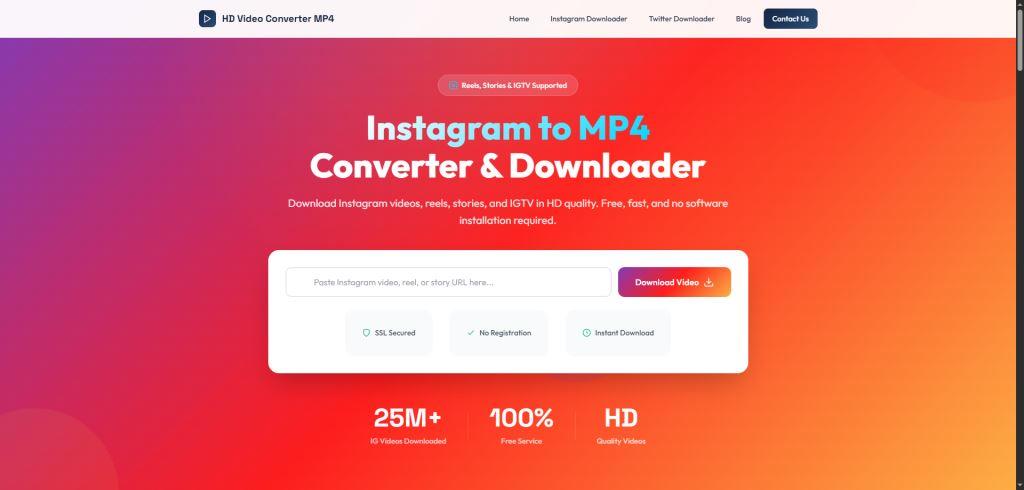
Online Instagram Video Downloaders are the most accessible
Online Instagram Video Downloaders are the most accessible. These are websites where you paste your link directly in the browser. Their major advantages are convenience (no installation) and cross-platform compatibility, working on iPhone, Android, Windows, and Mac alike. Top-rated web tools like FastDL and NymGram are praised for their clean interfaces, high speed, and lack of intrusive ads. They are perfect for occasional, on-the-fly downloads.
Mobile Applications offer a more integrated experience for smartphone users. Apps like “Instagram Downloader” on Google Play provide features like automatic gallery syncing, built-in media players, and organized offline libraries. They often have convenient features like one-touch clipboard detection, where the app automatically recognizes a copied Instagram link. The trade-off is installing an app and granting it certain permissions, so choosing one with a clear “no data collection” privacy policy is essential.
Desktop Software like 4K Stogram or Leawo Video Downloader caters to power users. These programs often support bulk downloads, automatic backups of entire profiles or hashtags, and sometimes include advanced features like video editing or conversion. They are typically suited for social media managers, researchers, or archivists who need to download and organize large volumes of content systematically.
Critical Selection Criteria: Safety, Speed, and Support
When comparing tools, prioritize your safety and the tool’s reliability. First, safety and privacy should be non-negotiable. Opt for tools that explicitly state they do not require you to log into your Instagram account, as this practice can be a security risk. Read the data policy; reputable tools state they do not store your downloaded content or personal data. Avoid any service riddled with aggressive pop-up ads, as these can be gateways to malware.
Second, evaluate speed and success rate. A good tool parses the link and prepares the download in seconds. Independent tests in 2026 show that leading services maintain near-perfect success rates for public content, while others may frequently fail with “URL not supported” errors. Finally, check format support. Ensure the tool works with all the content types you need: not just standard videos and Reels, but also Stories, carousel posts, and IGTV. The best tools, including our comprehensive online downloader, handle this full range seamlessly, giving you one solution for all your download needs.
| Tool Type | Best For | Pros | Cons |
|---|---|---|---|
| Online Website | Occasional users, multi-device access | No installation, works on all devices, often free | Requires browser, can be ad-supported |
| Mobile App | Frequent smartphone users | Integrated, fast access, offline library | Requires installation & permissions |
| Desktop Software | Power users, bulk downloads | Bulk/auto-download, advanced features | Usually paid, device-bound |
Practical Applications and Pro Tips
Downloading content is just the beginning. The real value lies in how you use these videos responsibly and creatively. Whether for personal inspiration, professional projects, or content creation, having a library of saved Instagram videos can be a powerful resource when done ethically and legally.
Creative and Ethical Uses for Downloaded Videos
For content creators and marketers, downloaded Reels serve as an invaluable inspiration library. You can analyze trending editing styles, transition techniques, and storytelling formats without needing an internet connection. A common professional practice is to save top-performing content in your niche to study why it resonates with audiences. Furthermore, you can repurpose your own downloaded content across other platforms, such as editing a vertical Reel into a landscape snippet for YouTube or a website banner.
On a personal level, downloading allows you to preserve meaningful moments. This could be a tutorial from a chef you admire, a travel video from a destination on your bucket list, or a funny clip you want to share directly with family via WhatsApp or email. The key ethical principle across all uses is respect for the original creator. Always give credit if you repost or share content publicly, and never use downloaded videos to impersonate or misrepresent the work as your own.
Advanced Techniques and Troubleshooting
Once you’re comfortable with the basics, you can employ advanced strategies. To build an organized library, create specific folders on your device or cloud storage (e.g., “Marketing Ideas,” “DIY Tutorials,” “Travel Inspo”). Some mobile downloader apps offer in-app organization features to help with this. If you encounter a download link that isn’t working, first double-check that the account is public. Then, try an alternative downloader tool; having 2-3 trusted options is wise as technical glitches can occur.
A major question users have is about watermarks. Instagram’s native “Download” feature for Reels adds a dynamic Instagram logo to the video. Most third-party online downloaders, however, provide the original file without any added watermark, which is a significant advantage. Remember, the legal landscape is clear: downloaded content should be for personal, fair use. The Digital Millennium Copyright Act (DMCA) and similar laws worldwide protect creators’ rights. Systematic downloading for commercial redistribution without permission is a violation. When in doubt, use content to inspire your original work rather than copying it directly.
Featured Tool: A Streamlined, High-Quality Solution
For users seeking a direct, no-fuss online solution, our Instagram to MP4 tool offers a reliable and efficient option. It embodies the key principles outlined in this guide, prioritizing user experience and quality output. This free web-based tool is designed for quick, secure downloads without the clutter.
-
Universal Compatibility: It works seamlessly on any device, desktop, iPhone, or Android, directly within your web browser. There’s no app to install, making it perfect for quick downloads wherever you are.
-
High-Quality Output: The tool is built to fetch and deliver the highest quality version of the video available, ensuring your saved copy retains its original clarity and resolution.
-
Privacy-Focused: Your privacy is respected. The service operates without requiring you to log in or provide any personal information, and it does not store the videos you download.
-
Simple Workflow: It follows the proven three-step process (Copy, Paste, Download) with a clean interface free of disruptive ads, letting you complete your task in seconds.
Ideal for anyone who values speed and simplicity, this tool integrates perfectly into a streamlined workflow for saving Reels, IGTV videos, and standard posts. You can access it here: Instagram Video Downloader.
Navigating Legal and Copyright Considerations
As the technical barriers to downloading lower, the importance of understanding and adhering to copyright law increases proportionally. In 2026, creators are more aware and protective of their intellectual property than ever. Using downloader tools comes with an implicit responsibility to respect the legal boundaries that protect that property.
The core principle is intended use. Instagram’s Terms of Service strictly prohibit downloading content you do not own without explicit permission. However, courts often recognize a doctrine of “fair use,” which allows for limited use of copyrighted material for purposes such as criticism, commentary, news reporting, teaching, or research. Saving a video for your private, offline viewing or to analyze its composition for educational purposes generally falls into a safer, more defensible category. The moment you use that downloaded video in a public-facing project, commercial venture, or repost it as your own, you risk infringing on copyright.
A good practice is to always assume content is copyrighted. Before downloading, ask yourself your purpose. If you plan to use it beyond personal viewing, seeking permission from the creator is the safest and most respectful path. Many creators are happy to grant permission for shares or collaborations when asked politely. Additionally, when evaluating downloader tools, note that reputable ones include disclaimers urging users to respect copyright and only download content they own or have permission to save. By choosing these responsible platforms and using their services ethically, you contribute to a healthier digital ecosystem. For more guidance on responsible use, explore our blog resources on ethical social media practices.
Mastering the Instagram link download in 2026 is about blending technical know-how with ethical awareness. You now have a clear roadmap: from executing the universal three-step method and selecting a safe, effective tool based on our comparison, to applying the content creatively while fully respecting copyright. The power to save inspiration, preserve memories, and fuel your projects is at your fingertips, use it wisely and well.
Ready to save your favorite Instagram videos quickly, safely, and in the highest quality? Try our optimized online tool today for a seamless download experience. Download Your First Video Now.







How to Facebook Video Download 4k – Ultimate Guide 2026
Want to save your favorite Facebook videos in crystal clear 4K quality without losing detail? In 2026, high resolution content...

How to Utilize a Video Converter Video to MP4
Have you ever found the perfect online video, only to realize you cannot save or play it offline when you...

Master Facebook Video Download by Link: Essential Guide 2026
Ever watched a brilliant tutorial, a hilarious clip, or a precious memory on Facebook, only to find it vanished or...
-
 Blog1 year ago
Step-by-Step Guide: How to download Facebook Videos as MP4
-
 Blog2 months ago
Facebook Link Download Guide – Tips, Tools, and Techniques to save FB link videos 2026
-

 Web Resource2 months ago
Download Story Insta – Smart Tips and Safe Techniques to get Insta videos in 2026
-

 Web Resource2 years ago
Enhancing Your Video Web Content for Online Audiences
-
 Blog1 year ago
MP4 vs. MKV vs. AVI | Which Video Format is Best?
-
 Blog2 months ago
9 Best Facebook Video Downloader App Choices for 2026
-

 Blog2 months ago
Why a TopStep Certificate Plaque is the Perfect Recognition for Your Trading Achievements
-

 Blog2 months ago
Unduhan Video Facebook Guide – Expert Tips for 2026